
The CRL HeatSage App menu bar can be found at the bottom of the page:

There are three options to choose from:
- Heating – this provides access to your Comfort Space Heating options
- Hot Water – this provides access to your Hot Water Boost and Water Time options
- Settings – provides access to your CRL HeatSage App System Settings
Heating Screen
Comfort affects how much charge is delivered to your storage heaters.
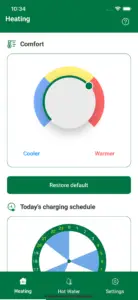
Selecting Restore Default restores Comfort back to its default setting where the green dot is at the 12 o’clock position.
Comfort Settings
Comfort affects how much charge is delivered to your storage heaters.
Unless you have requested otherwise, the system gives you more charge on cold days and less charge on mild days; this is known as Weather Compensation.
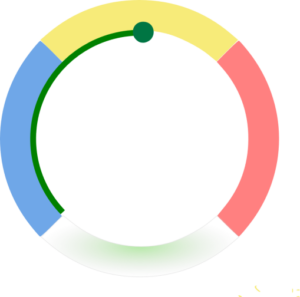
There is a standard Weather Compensation setting for all tenants which is known as the default setting.
The default setting is set as shown below. Selecting Restore Default will restore Comfort back to this setting.
Changing the comfort setting
You can choose to change the Comfort setting to suit your own needs.
NB – This changes the Comfort setting for the following day, not the current day. Once changed, the settings remain in place until you either change them again or select Restore Default.
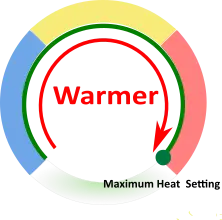
Turning right to left decreases the heat and can save you money.

Turning left to right increases the heat; this may cost you more.
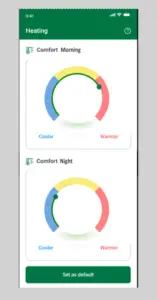
Depending on your tariff you may have two Comfort selection controls to allow for a morning and an evening selection, as shown below.
Today’s Charging Schedule
Depending on your CRL HeatSage App settings you may have a dial showing today’s actual weather charging as shown below:
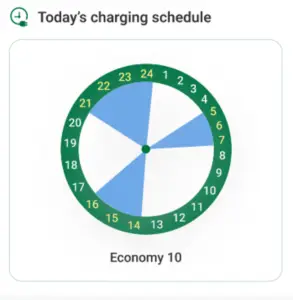
The blue bars in the dial are the times we will charge your storge heaters today. These times will change each day according to the local weather.
Economy 10
Under the dial is listed what we believe to be your current tariff.
If you change energy supplier or your tariff you MUST tell us to ensure we can correctly control your heating and hot water.
Notify CRL on 0800 048 9220 if you change tariff or supplier.
NB You cannot enter the details of your new supplier or tariff yourself. You must contact CRL.
Hot Water
Daily Charging Time
Hot water daily charging allows you to select when your water is heated.
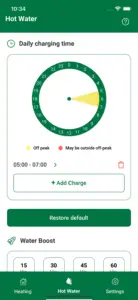
The dial displays the default 05.00h to 07.00h charging period (see the yellow segment in the image above) as well as any additional charging periods you choose to add.
If a segment is red, this indicates that a time has been chosen when electricity may be more expensive. Yellow indicates a time period when the electricity may be charged at a lower rate.
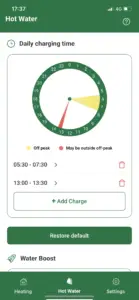
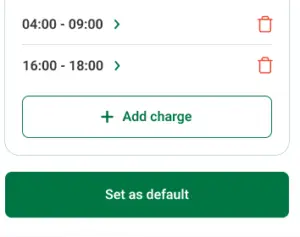
Clicking on the green arrows takes you to time start and end selections (a default time period is automatically displayed).
Add more charging periods as required by selecting + Add Charge.
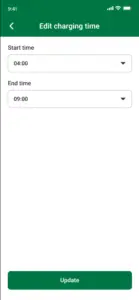
Select Update to confirm the new time or the white arrow in the header to go back to the previous page.
Select the Dustbin icon to remove any time settings that are no longer required.
Select Restore Default to remove any charging periods you may have added.
Water Heater Boost
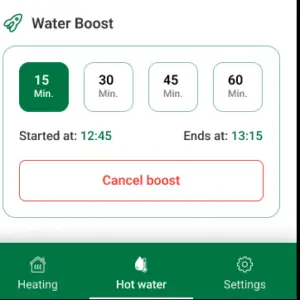
You can increase your hot water with a short one-shot heating boost.
Select the required duration: 15, 30, 45, or 60 minutes.
The boost is activated immediately; the start time and end time are indicated on screen.
The boost automatically stops at the end time as displayed.
Press Cancel Boost to end the boost period at any time.
Settings
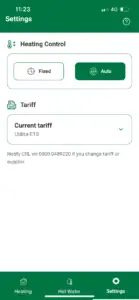
Heating control
The settings tab allows you to select a fixed or automatically controlled time schedule for the heating.
Selecting Auto means your heating will be managed to take advantage of weather compensation. This is the recommended setting.
Selecting Fixed means you remove weather compensation and can schedule charging at any time over a 24-hour time window. Please note, however, that selecting Fixed could lead to a significant increase in your energy bill.
NB – This feature is currently locked to Auto and can only be changed by contacting CRL on 0800 048 9220.
Tariff
The Tariff box displays what we understand to be your current energy tariff.
If you change energy supplier or your tariff you MUST tell us to ensure we can correctly control your heating and hot water.
Notify CRL on 0800 048 9220 if you change tariff or supplier.
NB You cannot enter the details of your new supplier or tariff yourself. You must contact CRL.
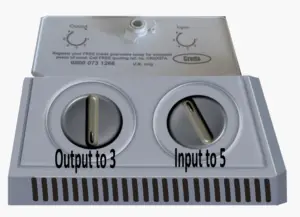
Storage Heater Controls
To achieve best results please set the control knobs on your heaters as shown below:
NB – The layout of your heater controls may vary from those in the image.
Useful Web Sites
CRL – https://connectedresponse.co.uk/
Energy Saving Trust – https://energysavingtrust.org.uk/advice/guide-to-smart-meters/