
Main Selection Bar Help

This is the main section bar and is found at the bottom of the screen.
There are three selection buttons.
- Heating provides access to space heating “Comfort” setting.
- Hot Water provides access to boost and water time setting.
- Settings provides access to system settings.
Heating Screen and help
The Comfort affects how much charge is delivered to the storage heater.
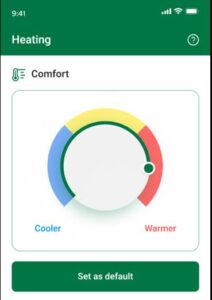
Pressing the “Restore Default Settings” will set the level back to this setting or slide back.
Help On Comfort Setting
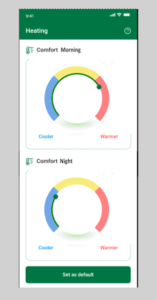
The Comfort affects how much charge is delivered to the storage.
The default level is set as below.
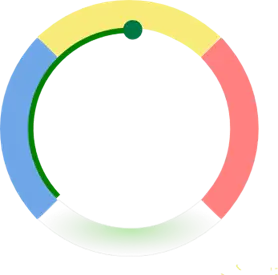
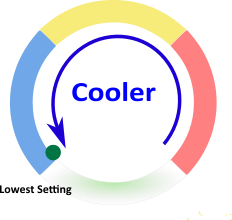
Sliding right to left decreases the heat and can save money.
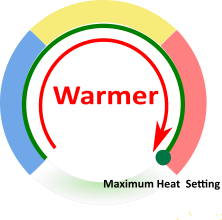
Moving the green slider left to right increases the heat – this may cost more.
Depending on your tariff you may have two Comfort selection boxes
This allows a morning and evening selection.
Help on Today’s Charging Schedule
The blue bars in the dial are the times we will charge your storge heaters today.
This will change each day according to the local weather.
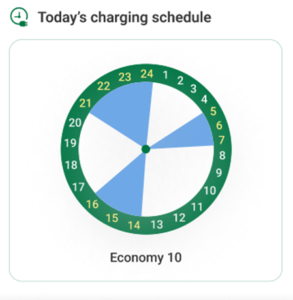
This is what we believe your current tariff is.
If you change energy supplier or your tariff you
MUST tell us to ensure we can correctly control your heating and hot water.
Hot Water Daily Charging Time
Hot water daily charging allows selection of when water is heated.
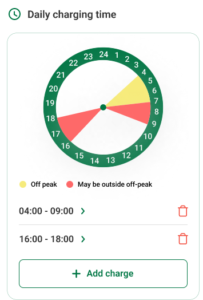
The Dial will show what times have been selected. From the drop-down selection.
If the band is red this means that a time has been chosen when electricity is more expensive.
Yellow means a lower rate time period.
Clicking on the right-hand arrow takes you to a time start and end selection.
Two time periods are indicated by default.
Press the and more can be added if required by pressing +Add Charge.
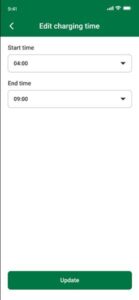
Pressing the update but accepts the new time or go back.
Press the BIN icon to remove the time.
Press Set as Default to restore the default settings.
Water Heater Boost
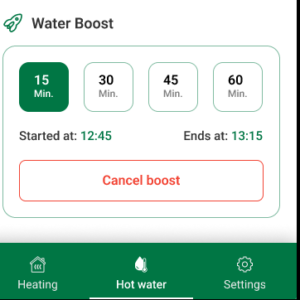
Water can be heated with a one-shot boost.
Select the required time 15,30,45,60 minutes.
The boost will act immediately, and the start time and end time indicated.
The boost automatically stops at the end time.
Press the Cancel Boost Button to stop the boost at any time.
Settings
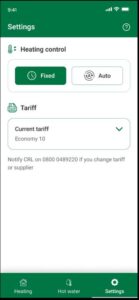
The settings tab allows the user to select a fixed or automatically controlled time schedule for the heating.
The automatic select button will manage the heating to take advantage of weather compensation.
This is the recommended setting.
This feature currently is locked to Auto and cannot be changed.
Tariff -indicates what we understand is your current energy tariff.
If you change your tariff, please let us know.
Storage Heater Controls
For best results the control knobs on the heater should be set as illustrated below:
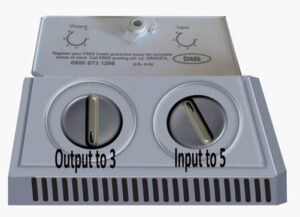
The layout of your heater may vary.
Account Close
To close your HeatSage account go to: Close your HeatSage Account
Useful Web Sites
https://www.wheatleyhomes-glasgow.com/
Connected Response
Smart meters explained